Google Block Breaker: How to Play and Best Tips
Google Block Breaker: How to Play and Best Tips

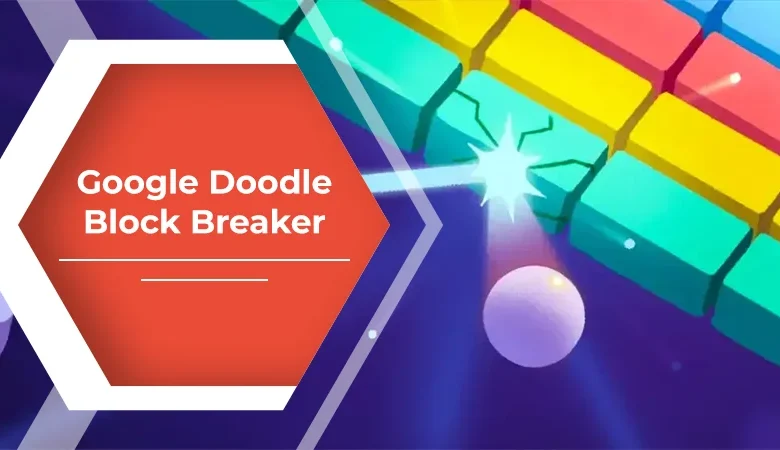
If you enjoy quick arcade games that require more timing than complicated instructions, Google Block Breaker is an easy game to understand and surprisingly difficult to master. The concept is familiar: control a paddle, keep a bouncing ball in play, and destroy blocks arranged across the screen. What makes the experience appealing is how quickly you can start playing without learning a complicated control system.
Google introduced Block Breaker as a playable experience within Search in January 2025. Searching for “Block Breaker” can bring up an interactive game card, allowing players to launch the game directly from Google Search on supported devices. The game draws heavily from the classic Breakout-style formula while adding colorful blocks, different challenges, and power-ups.
What Is Google Block Breaker?
At its core, this is a modern browser-based take on the classic brick-breaking arcade genre. A paddle sits near the bottom of the playing area while a ball travels around the screen, bouncing off surfaces and destroying blocks.
The objective sounds simple: clear the blocks without allowing the ball to pass your paddle.
That simplicity is exactly what gives the game its appeal. There is no lengthy tutorial or complicated character progression. You can understand the basic mechanic within seconds, but advancing through increasingly challenging rounds requires concentration, positioning, and good timing.
The game is also connected conceptually to Google’s history of playful Search experiences. It should not, however, be confused with the older Atari Breakout Easter egg that transformed Google Images into a playable brick-breaking game in 2013. That was a separate experience.
How to Play the Game
Getting started is straightforward.
Open Google Search and enter “Block Breaker” or a similar search phrase. When the interactive game card is available, select the play option. On desktop, the paddle can be controlled with the left and right arrow keys, while mobile players can move it through touch controls.
The basic gameplay loop is:
- Launch the ball.
- Move the paddle underneath its expected path.
- Bounce the ball back toward the blocks.
- Break as many blocks as possible.
- Collect useful bonuses when they appear.
- Avoid letting the ball pass the paddle.
- Continue into harder rounds.
The challenge increases because your reaction time becomes more important as the game progresses.
Controls and Device Experience
One reason this type of game works so well in Search is its accessibility. You don’t need a dedicated gaming controller or powerful computer.
| Device | Typical Control | Best For |
|---|---|---|
| Desktop PC | Left/right arrow keys | Precise paddle movement |
| Laptop | Arrow keys | Comfortable longer sessions |
| Smartphone | Touch or drag controls | Quick casual play |
| Tablet | Touch controls | Larger mobile playing area |
The desktop experience is particularly useful when you’re trying to improve your score because keyboard controls make small adjustments easier. On mobile, direct touch interaction feels more natural for short sessions.
Availability can vary depending on Google’s Search experience, device, region, or testing. If the interactive card doesn’t appear, that does not necessarily mean your browser is malfunctioning. Google sometimes changes or experiments with Search features.
Understanding the Gameplay Mechanics
The most important skill is not simply moving the paddle quickly. It is predicting where the ball will travel.
A careless player tends to follow the ball visually and react at the last moment. A better approach is to anticipate its trajectory and position the paddle before the ball reaches the bottom of the screen.
The angle of contact matters, too. Hitting the ball toward different parts of the paddle can influence its direction. That creates opportunities to target areas of the block formation that are otherwise difficult to reach.
As blocks disappear, openings develop. Instead of repeatedly hitting the same accessible area, experienced players can use those gaps to create more useful trajectories.
This turns what initially feels like a reflex game into a small exercise in prediction and spatial awareness.
Power-Ups Add Another Layer
One of the features that separates the modern Search version from a completely bare-bones brick breaker is its collection of bonuses.
Reports about the game have described power-ups that can provide advantages such as additional balls, an extended paddle, TNT-style effects, or other temporary abilities.
These bonuses can dramatically change a round.
For example, an enlarged paddle can make it easier to survive a difficult sequence, while additional balls may allow you to attack several parts of the board simultaneously. The best strategy isn’t necessarily to chase every bonus, though. Sometimes maintaining control of the current ball is more valuable than moving aggressively toward a falling power-up.
Practical Strategies for Better Scores
If you want more than a few casual minutes of entertainment, several habits can make a noticeable difference.
Watch the angle, not just the ball. Try to understand where the ball is heading after every bounce.
Protect the center. Keeping the paddle reasonably aligned with the ball gives you more time to respond.
Use openings intelligently. Once a section of blocks disappears, exploit the new pathway rather than repeatedly attacking the same surface.
Don’t overreact. Fast movements can actually make you miss. Controlled adjustments are often more effective.
Prioritize survival. A spectacular attack means little if you lose the ball immediately afterward.
Learn from failed rounds. Each mistake can reveal a predictable movement pattern or timing problem.
I found that the biggest improvement in this style of game comes from anticipating the bounce rather than simply trying to react faster.
How Google Block Breaker Fits Into Casual Gaming
Imagine you have ten minutes before a meeting, class, or appointment. You don’t want to install a game, create an account, or commit to a 30-minute multiplayer match. You search for Block Breaker, launch the playable experience, and spend a few minutes trying to beat your previous score.
That situation explains the game’s practical appeal. It fills the gap between “I have nothing to do” and “I want to play a full game.” The session can be short, spontaneous, and immediately understandable.
Google Block Breaker vs. Classic Breakout
The similarities to Atari’s Breakout are obvious: paddle, ball, blocks, and increasingly demanding gameplay.
However, modern browser implementations can add features that weren’t part of the original minimalist formula. Google’s version incorporates its own visual identity and reported power-ups, giving the traditional concept a more contemporary feel.
The result is familiar without feeling completely outdated. Someone who remembers classic arcade games can recognize the formula immediately, while a younger player can enjoy it without knowing anything about the game’s history.
Why the Game Remains Appealing
The strongest quality of this experience is its low barrier to entry.
There are no complicated skill trees, dozens of buttons, or long explanations. The objective is visible immediately. Yet beneath that simplicity is enough variation to encourage repeated attempts.
It also benefits from the psychology of short-session gaming. You can play for two minutes, stop, and return later. That makes the format particularly suitable for casual users who aren’t looking for a large downloadable title.
More importantly, the game demonstrates how an ordinary search engine can become a small entertainment platform. A simple query can lead directly to an interactive experience instead of another static page.
Is It the Same as the Old Atari Breakout Easter Egg?
No. This distinction is important because the two experiences are frequently mixed together online.
Google’s 2013 Atari Breakout Easter egg appeared through Google Images after users searched for the relevant term. The newer Block Breaker experience is a separate Search game introduced years later.
So, if an old tutorial tells you to open Google Images and search for Atari Breakout, it may be describing the historical Easter egg rather than the newer Search-based game.
FAQs
Is Google Block Breaker free?
The Search-based game is presented as a free interactive experience rather than a paid title. It does not require purchasing a conventional game license to start playing.
Do I need to download an app?
No download is normally required when the game is available directly through Google Search. It runs as a browser-based experience.
Can I play it on a phone?
Yes, the game has been reported as available on mobile web, with touch-based paddle controls. It has also been reported as accessible through the Google app on Android and iOS.
Is Google Block Breaker the same as Atari Breakout?
No. Both belong to the same brick-breaking tradition, but Google’s newer Block Breaker and the 2013 Atari Breakout Google Images Easter egg are separate experiences.
What is the best way to improve?
Focus on prediction, paddle positioning, controlled movement, and survival. Instead of reacting only when the ball reaches the bottom, watch its trajectory and prepare for the next bounce.
Read More: Influencers Gone Wild: Viral Trends, Risks & Insights
Conclusion
Google Block Breaker succeeds because it doesn’t overcomplicate a timeless arcade formula. The combination of a paddle, bouncing ball, colorful blocks, progressive difficulty, and useful power-ups creates an experience that is easy to enter but rewarding to practice.
Its biggest strength may be convenience. When the game is available in Search, there is little friction between wanting to play and actually playing. For someone seeking a quick arcade challenge, a nostalgic experience, or simply a few minutes of entertainment, it offers a compelling reason to turn an ordinary search into a gaming session.
And while it carries the spirit of classic Breakout, it should be recognized as a newer Google Search experience rather than being mistaken for the company’s older Atari Breakout Easter egg. That distinction makes the history—and the modern version—much easier to understand.